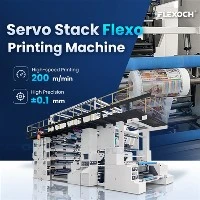
Hey there! As a supplier of Paper Cup Flexo Printing Machines, I've seen my fair share of issues that customers run into. These machines are pretty nifty, but like any piece of equipment, they can have their moments. So, I thought I'd share some tips on how to troubleshoot common problems in a Paper Cup Flexo Printing Machine.
1. Ink Transfer Issues
One of the most common problems is poor ink transfer. You might notice that the print on your paper cups looks faded, patchy, or just doesn't seem to be coming out right.
Possible Causes and Solutions
- Dirty Anilox Roll: The anilox roll is responsible for metering the ink onto the printing plate. If it's dirty, it won't be able to transfer the ink evenly. To fix this, you can use a specialized anilox cleaner and a soft brush to gently scrub the roll. Make sure to follow the manufacturer's instructions for the cleaner.
- Worn Printing Plate: Over time, the printing plate can wear out, which can lead to uneven ink transfer. Check the plate for any signs of damage or excessive wear. If it's worn, you'll need to replace it with a new one.
- Incorrect Ink Viscosity: The viscosity of the ink plays a crucial role in how it transfers. If the ink is too thick or too thin, it won't transfer properly. You can use a viscometer to measure the viscosity and adjust it by adding ink thinner or thickener as needed.
-
 Dirty Anilox Roll
 Worn Printing Plate
 Incorrect Ink Viscosity
2. Registration Problems
Registration refers to the alignment of the different colors in the print. If the colors aren't lined up correctly, you'll end up with a blurry or misaligned print.
Possible Causes and Solutions
- Loose Belts or Chains: The belts and chains in the machine are responsible for moving the paper cups through the printing process. If they're loose, it can cause the cups to move out of alignment. Check the tension of the belts and chains and adjust them as necessary.
- Incorrect Adjustment of Printing Units: Each printing unit needs to be properly adjusted to ensure accurate registration. Make sure the units are aligned correctly and that the pressure is evenly distributed. You may need to refer to the machine's manual for specific adjustment instructions.
- Warped Paper Cups: Sometimes, the paper cups themselves can be warped, which can make it difficult to achieve proper registration. Inspect the cups before printing and discard any that are visibly warped.
3. Drying Issues
If the ink doesn't dry properly, it can smudge or rub off easily, ruining the print quality.
Possible Causes and Solutions
- Inadequate Drying Temperature: The drying temperature needs to be set correctly to ensure that the ink dries quickly and completely. Check the temperature settings on the dryer and adjust them if necessary. However, be careful not to set the temperature too high, as this can damage the paper cups.
- Poor Air Circulation: Proper air circulation is essential for drying the ink. Make sure the vents and fans in the dryer are clean and unobstructed. You may also need to adjust the airflow settings to ensure that the air is evenly distributed.
- Incorrect Ink Type: Some inks require specific drying conditions. Make sure you're using the right type of ink for your machine and that it's compatible with the drying system.
4. Machine Noise and Vibration
Excessive noise and vibration can be a sign of a problem with the machine.
Possible Causes and Solutions
- Loose Parts: Check the machine for any loose bolts, nuts, or other parts. Tighten them up to reduce the noise and vibration.
- Worn Bearings: Bearings can wear out over time, causing noise and vibration. Inspect the bearings and replace any that are worn or damaged.
- Imbalanced Rollers: If the rollers are imbalanced, it can cause the machine to vibrate. You may need to have the rollers balanced by a professional.
5. Electrical Problems
Electrical issues can cause the machine to malfunction or not work at all.
Possible Causes and Solutions
- Blown Fuses: Check the fuses in the machine's electrical panel. If a fuse is blown, replace it with a new one of the same rating.
- Loose Electrical Connections: Inspect the electrical connections for any signs of looseness or damage. Tighten any loose connections and replace any damaged wires.
- Faulty Control Panel: If the control panel isn't working properly, it can cause the machine to behave erratically. You may need to have the control panel repaired or replaced by a qualified technician.
Other Resources
If you're interested in learning more about different types of flexo printing machines, check out these links: Gearless Flexo Printing Machine, Non Woven Flexo Printing Machine, and Sleeve Type CI Flexo Printing Machine.
Conclusion
Troubleshooting common problems in a Paper Cup Flexo Printing Machine can seem daunting at first, but with a little knowledge and some basic maintenance, you can keep your machine running smoothly. If you're still having issues or if you're not comfortable troubleshooting on your own, don't hesitate to reach out to us. We're here to help you get the most out of your machine and ensure that your printing operations are a success. Whether you're looking to purchase a new machine or need assistance with an existing one, we'd love to have a chat with you about your needs.


References
- Manufacturer's manual for the Paper Cup Flexo Printing Machine
- Industry best practices for flexo printing machine maintenance