Flexographic printing is a popular and versatile printing method used in various industries, from packaging to label printing. As a flexographic machines supplier, one question I often get asked is, “How often should the plates in a flexographic machine be replaced?” It's a crucial question because the condition of the flexo plates directly impacts print quality, efficiency, and ultimately, your bottom line. In this blog post, I'll break down the key factors that determine plate replacement frequency and share some practical tips to help you make the best decisions for your printing operations.
Understanding Flexo Plates
Before we dive into the replacement schedule, it's essential to understand what flexo plates are and how they work. Flexo plates are made from a flexible photopolymer material that's sensitive to light. These plates are created by exposing a negative image onto the plate material, which hardens the exposed areas while leaving the unexposed areas soft. The soft areas are then washed away, leaving a raised image on the plate's surface. When the plate is mounted on the printer and comes into contact with the substrate, the ink on the raised areas is transferred, creating the printed image.
Factors Affecting Plate Replacement Frequency
Several factors can influence how often you need to replace the plates in your flexographic machine. Let's take a closer look at each of these factors:
Print Volume
One of the most significant factors is the amount of printing you're doing. If you're running high-volume jobs, your plates will wear out faster than if you're doing low-volume runs. For example, a packaging company printing thousands of boxes a day will likely need to replace plates more frequently than a small business printing a few hundred labels a week. As a rule of thumb, the more impressions a plate makes, the quicker it will degrade.
Ink Type
The type of ink you use also plays a role in plate longevity. Some inks, like solvent-based inks, can be more aggressive and cause faster wear on the plates. On the other hand, water-based and UV-curable inks are generally less damaging to the plates. If you're using solvent-based inks, you might need to replace your plates more often compared to those using water-based or UV-curable alternatives.
Substrate Material
The material you're printing on can have a big impact on plate wear. Rough or abrasive substrates, such as recycled cardboard or certain types of paperboard, can cause more friction and wear on the plates. In contrast, smooth substrates like plastic film or high-quality paper generally result in less wear. So, if you're printing on rough materials regularly, you'll need to keep a closer eye on your plate condition and replace them more frequently.
Plate Quality
It goes without saying that the quality of the flexo plates matters. Higher-quality plates are typically more durable and resistant to wear and tear. When you invest in better plates, you can expect them to last longer. As a flexographic machines supplier, I always recommend using plates from reputable manufacturers known for their quality and consistency.
Press Settings
The settings on your flexographic machine can also affect plate life. Incorrect pressure settings, for example, can cause excessive wear on the plates. If the pressure is too high, it can crush the plate's surface, leading to a loss of sharpness and detail in the printed image. Similarly, if the anilox roll is not properly calibrated, it can apply too much or too little ink to the plate, which can also impact its longevity.
Signs That It's Time to Replace Your Plates
Now that we've covered the factors that affect plate replacement frequency, let's talk about how to know when it's actually time to replace your plates. Here are some common signs to look out for:

Poor Print Quality
If you notice a decline in print quality, such as blurry images, missing details, or inconsistent ink coverage, it could be a sign that your plates are worn out. Over time, the raised areas on the plate can become flattened, which affects the way the ink is transferred to the substrate.
Increased Maintenance
If you find yourself spending more time cleaning and maintaining your plates to achieve acceptable print quality, it might be time to replace them. Excessive cleaning can also cause further damage to the plates, so it's often more cost-effective to replace them when they start showing signs of wear.
Plate Damage
Visible damage to the plate, such as cracks, chips, or scratches, is an obvious sign that it needs to be replaced. Even small damages can affect the print quality and cause issues with ink transfer.
General Guidelines for Plate Replacement
While there's no one-size-fits-all answer to how often you should replace your flexo plates, here are some general guidelines based on the factors we've discussed:
- Low-Volume Printing: If you're doing low-volume runs (less than 10,000 impressions per month) on smooth substrates with water-based or UV-curable inks, you might be able to get away with replacing your plates every few months.
- Medium-Volume Printing: For medium-volume operations (10,000 - 50,000 impressions per month), plates may need to be replaced every four to eight weeks, depending on the other factors like substrate and ink type.
- High-Volume Printing: In high-volume settings (more than 50,000 impressions per month), plates may need to be replaced weekly or even more frequently, especially if you're using abrasive substrates and solvent-based inks.
Tips to Extend Plate Life
As a flexographic machines supplier, I want to help you get the most out of your plates. Here are some tips to extend their lifespan:
- Proper Storage: Store your plates in a cool, dry place away from direct sunlight. Exposure to heat, humidity, and UV light can cause the plates to warp or degrade over time.
- Regular Cleaning: Clean your plates after each use to remove any ink residue. Use a gentle cleaning solution that's compatible with the plate material to avoid damaging it.
- Correct Press Settings: Make sure your press is properly calibrated and that the pressure, anilox roll, and other settings are optimized for your specific printing job. This can help reduce wear on the plates.
- Inspect Regularly: Regularly inspect your plates for signs of wear and damage. Catching issues early can help you avoid more significant problems and extend the life of the plates.
Our Flexographic Machines
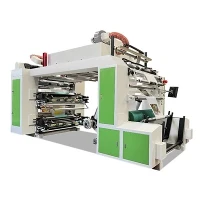
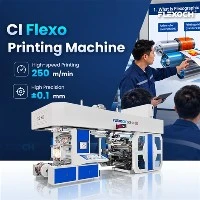
At our company, we offer a range of high-quality flexographic machines to meet your printing needs. Whether you're looking for a 4 Color Stack Flexo Printing Machine, an 8 Color CI Flexo Printing Machine, a 4 Colour Gearless Flexo Printing Press, an 8 Colour Stack Type Flexo Printing Machine, or an 8 Colour Gearless Flexo Printing Press, we've got you covered. Our machines are designed to work seamlessly with high-quality flexo plates, ensuring optimal print quality and efficiency.
Contact Us for More Information
If you have any questions about flexo plate replacement, our flexographic machines, or need help choosing the right equipment for your printing operations, don't hesitate to reach out. We're here to provide you with the support and expertise you need to succeed in the competitive printing industry. Let's start a conversation about how we can help you achieve your printing goals.
References
- Drupa: International Trade Fair for Printing, Media and Packaging. (2023). Flexographic Printing Technology Trends.
- PrintWeek. (2022). Best Practices for Flexo Plate Maintenance.
- Packaging Digest. (2021). Impact of Substrate on Flexo Printing Quality.