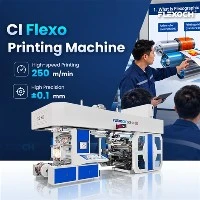
Setting up the printing parameters on a PE Film Flexo Printing Machine is a crucial process that directly impacts the quality and efficiency of the printing job. As a leading supplier of PE Film Flexo Printing Machines, I understand the importance of getting these parameters right. In this blog, I'll guide you through the key steps and considerations for setting up the printing parameters effectively.
Understanding the Basics
Before diving into the specific parameters, it's essential to understand the basic components of a PE Film Flexo Printing Machine. The machine consists of an unwinding unit, a printing unit, a drying unit, and a rewinding unit. The printing unit is where the magic happens, with a series of cylinders, plates, and ink systems working together to transfer the desired image onto the PE film.
Key Parameters to Consider
1. Ink Viscosity
Ink viscosity is one of the most critical parameters when it comes to flexo printing. It affects the transfer of ink from the anilox roller to the printing plate and then to the substrate. If the ink is too thick, it may not transfer evenly, resulting in poor print quality and clogging of the anilox cells. On the other hand, if the ink is too thin, it may spread too much, causing blurry images and ink bleed.
To set the correct ink viscosity, you can use a viscosity cup. Simply pour the ink into the cup and measure the time it takes for the ink to flow through the orifice. The ideal viscosity will depend on factors such as the type of ink, the anilox roller specification, and the printing speed. Most ink manufacturers provide recommended viscosity ranges for their products, so it's a good idea to follow these guidelines.

2. Anilox Roller Selection
The anilox roller plays a crucial role in controlling the amount of ink transferred to the printing plate. It has a series of tiny cells engraved on its surface, and the volume and shape of these cells determine the ink transfer rate. When selecting an anilox roller, you need to consider the line screen (number of cells per linear inch) and the cell volume.
A higher line screen will result in finer details and less ink transfer, making it suitable for high-resolution printing. Conversely, a lower line screen will transfer more ink, which is ideal for solid colors and large areas of coverage. The cell volume also affects the ink transfer, with larger cells holding more ink. You can refer to our High Speed Flexo Printing Machine product page for more information on anilox roller selection and its impact on printing quality.


3. Printing Pressure
Printing pressure is another important parameter that affects the print quality. It refers to the force applied between the printing plate and the substrate. If the pressure is too high, it can cause the ink to spread, resulting in blurred edges and overprinting. If the pressure is too low, the ink may not transfer properly, leading to missing dots and uneven coverage.
To set the correct printing pressure, you need to adjust the position of the printing cylinders. Most modern PE Film Flexo Printing Machines are equipped with pressure adjustment systems that allow you to fine-tune the pressure easily. You can start by setting the pressure slightly lower than the recommended value and gradually increasing it while checking the print quality. A good way to check the pressure is to print a test pattern and examine the edges and details of the image.
4. Drying Temperature and Airflow
Proper drying is essential to ensure that the ink adheres to the PE film and does not smudge or rub off during handling. The drying unit of the flexo printing machine uses heat and airflow to evaporate the solvents in the ink. The drying temperature and airflow rate need to be carefully adjusted to achieve optimal drying results.
If the drying temperature is too high, it can cause the PE film to shrink or warp, affecting the print quality. On the other hand, if the temperature is too low, the ink may not dry completely, resulting in smudging and sticking. The airflow rate also plays a role in drying efficiency, as it helps to remove the evaporated solvents from the drying chamber. You can find more information on drying systems and their impact on printing quality in our Pp Woven Bag Flexo Printing Machine product page.
5. Tension Control
Tension control is crucial for maintaining the stability of the PE film during the printing process. If the tension is too high, it can cause the film to stretch or break, leading to printing defects. If the tension is too low, the film may wrinkle or sag, resulting in uneven printing.
Most PE Film Flexo Printing Machines are equipped with tension control systems that use sensors to monitor the tension of the film and adjust the speed of the unwinding and rewinding units accordingly. You need to set the correct tension values based on the thickness and type of the PE film. It's also important to ensure that the tension is uniform across the width of the film to avoid printing problems.
Step-by-Step Setup Process
Now that you understand the key parameters, here's a step-by-step guide to setting up the printing parameters on a PE Film Flexo Printing Machine:
- Prepare the Machine: Make sure the machine is clean and in good working condition. Check the ink supply system, the anilox rollers, and the printing plates for any damage or blockages.
- Select the Anilox Roller: Based on the print job requirements, select the appropriate anilox roller with the correct line screen and cell volume. Install the anilox roller onto the machine and ensure it is properly aligned.
- Prepare the Ink: Check the ink viscosity using a viscosity cup and adjust it if necessary. Pour the ink into the ink fountain and start the ink circulation system to ensure an even flow of ink.
- Install the Printing Plate: Carefully install the printing plate onto the plate cylinder and make sure it is securely attached. Align the plate with the registration marks on the machine to ensure accurate printing.
- Set the Printing Pressure: Adjust the position of the printing cylinders to set the correct printing pressure. Start with a low pressure and gradually increase it while checking the print quality.
- Configure the Drying System: Set the drying temperature and airflow rate based on the type of ink and the printing speed. Make sure the drying chamber is clean and free of any debris.
- Adjust the Tension Control: Set the tension values for the unwinding and rewinding units based on the thickness and type of the PE film. Check the tension across the width of the film and make any necessary adjustments.
- Run a Test Print: Before starting the full production run, run a test print to check the print quality. Examine the print for any defects such as smudging, missing dots, or uneven coverage. Make any necessary adjustments to the parameters based on the test print results.
- Start the Production Run: Once you are satisfied with the test print, start the production run. Monitor the printing process closely and make any adjustments to the parameters as needed to ensure consistent print quality.
Video Introduction
Additional Considerations
- Maintenance: Regular maintenance of the PE Film Flexo Printing Machine is essential to ensure its optimal performance. This includes cleaning the ink system, lubricating the moving parts, and replacing any worn-out components.
- Operator Training: Proper training of the machine operators is crucial for setting up the printing parameters correctly and achieving high-quality prints. Make sure your operators are familiar with the machine's operation and the key printing parameters.
- Quality Control: Implement a quality control system to monitor the print quality during the production run. This can include visual inspection, measuring the color density, and checking the registration accuracy.
Conclusion
Setting up the printing parameters on a PE Film Flexo Printing Machine requires careful attention to detail and a good understanding of the key factors that affect print quality. By following the steps outlined in this blog and considering the additional considerations, you can achieve consistent and high-quality prints on your PE film.
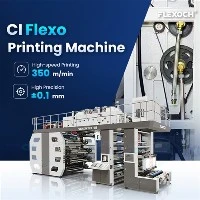
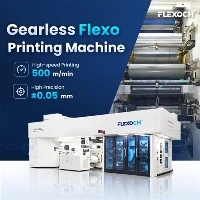
As a leading supplier of PE Film Flexo Printing Machines, we offer a wide range of Gearless Flexo Printing Machine, Wide Web Flexo Press, and CI Flexo Machine to meet your specific printing needs. If you have any questions or need further assistance with setting up the printing parameters on our machines, please don't hesitate to contact us for a professional consultation and potential purchasing negotiation.


References
- "Flexographic Printing Technology Handbook" by Flexographic Technical Association
- "Ink Technology for Flexographic and Gravure Printing" by John Wiley & Sons