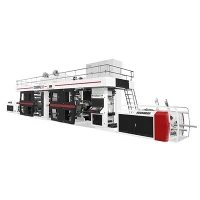
Cleaning a CI (Central Impression) press is a crucial maintenance task that ensures optimal performance, extends the machine's lifespan, and guarantees high - quality printing results. As a CI press supplier, I understand the importance of sharing best practices for cleaning these sophisticated machines. In this blog, I'll guide you through the process of cleaning a CI press and highlight key points to keep in mind.
Preparation Before Cleaning
Before you start cleaning your CI press, it's essential to take some preparatory steps. First, ensure the press is completely turned off and disconnected from the power source. This is a safety measure to prevent any accidental start - up during the cleaning process. Next, gather all the necessary cleaning supplies. You'll typically need a mild cleaning solution, clean lint - free cloths, soft - bristle brushes, and possibly some specialized cleaning agents recommended by the press manufacturer.

It's also a good idea to have a detailed manual for your specific CI press model on hand. The manual will provide you with specific instructions on cleaning different parts of the machine, as well as any safety warnings. Additionally, make sure you have enough time set aside for the cleaning process. Rushing through it can lead to incomplete cleaning and potential damage to the press.
Cleaning the Printing Cylinders
The printing cylinders are one of the most critical parts of a CI press, as they directly transfer the ink and image onto the substrate. To clean the cylinders, start by removing any excess ink using a soft - bristle brush or a scraper. Be careful not to scratch the surface of the cylinders, as this can affect the print quality.
Once the excess ink is removed, dampen a lint - free cloth with a mild cleaning solution and gently wipe the surface of the cylinders. Make sure to clean in the direction of the cylinder's rotation to avoid any streaks. For stubborn ink stains, you may need to use a specialized cylinder cleaner. However, always test the cleaner on a small, inconspicuous area first to ensure it does not damage the cylinder's surface.
Ink Systems and Tanks
Proper cleaning of the ink systems and tanks is vital for maintaining consistent ink flow and preventing ink contamination. Begin by draining all the remaining ink from the tanks. Empty the ink into a suitable container for proper disposal, following all local environmental regulations.
After draining the ink, flush the ink system with a cleaning solution. This can typically be done by running the cleaning solution through the hoses and pumps. Use a soft - bristled brush to clean the interior of the tanks, scrubbing away any dried ink or residue. Rinse the tanks thoroughly with clean water and dry them completely before refilling with fresh ink.
Doctor Blades and Chambers
Doctor blades are responsible for controlling the amount of ink applied to the printing cylinders. Over time, they can accumulate ink and debris, which can affect their performance. To clean doctor blades, remove them carefully from the press. Use a sharp blade or a specialized doctor blade cleaner to remove any dried ink or build - up on the blade's edge.
Clean the doctor blade chambers as well. Wipe the interior of the chambers with a lint - free cloth dampened with a cleaning solution. Check for any clogs in the ink inlets or outlets of the chambers and clear them using a small brush or compressed air.

Anilox Rolls
Anilox rolls play a crucial role in metering the ink onto the printing plates. Cleaning anilox rolls requires a more delicate approach. Start by using an anilox roll cleaner specifically formulated for this purpose. Apply the cleaner to the surface of the roll and let it sit for the recommended time to break down the ink and debris.
Use a soft - bristle brush or an anilox roll brush to gently scrub the surface of the roll. Be careful not to apply too much pressure, as this can damage the cells of the anilox roll. Rinse the roll thoroughly with water and dry it using a clean, dry cloth.
Other Press Components
In addition to the major components mentioned above, there are other parts of the CI press that need regular cleaning. The impression cylinders should be cleaned to ensure proper contact between the printing plates and the substrate. Wipe the surface of the impression cylinders with a clean cloth and a mild cleaning solution.
The frame and the exterior of the press should also be kept clean. Dust and debris can accumulate on these surfaces, which can potentially find their way into the internal parts of the machine. Use a clean cloth and a mild cleaning solution to wipe down the frame and exterior of the press.
Frequency of Cleaning
The frequency of cleaning your CI press depends on several factors, such as the volume of printing, the type of ink used, and the environmental conditions in which the press operates. For high - volume printing operations, it may be necessary to clean the press daily or after each print job. In less demanding environments, regular cleaning once or twice a week may be sufficient.
Safety Precautions
When cleaning a CI press, always wear appropriate personal protective equipment (PPE). This may include gloves, safety glasses, and a respirator if you are using cleaning chemicals that emit fumes. Make sure the area where you are cleaning is well - ventilated to prevent the build - up of harmful vapors.
If you encounter any problems during the cleaning process, such as a stuck part or a leak, do not attempt to fix it yourself unless you are trained to do so. Instead, contact a professional technician or the press manufacturer for assistance.
Conclusion
Cleaning a CI press is a comprehensive process that requires attention to detail and adherence to safety protocols. By following the steps outlined in this blog, you can ensure that your CI press operates at its best, producing high - quality prints consistently.
As a CI press supplier, I also offer a range of high - quality CI presses, including the 4 Color Stack Flexo Printing Machine, Gearless CI Flexographic Printing Machine, 4 Color CI Flexo Printing Machine, 8 Colour Gearless Flexo Printing Press, and 8 Colour Stack Type Flexo Printing Machine. If you are looking to invest in a new CI press or have any questions about press maintenance, feel free to reach out for a purchase consultation.


References
- Manufacturer's manuals for CI presses
- Industry - standard cleaning guides for flexographic printing equipment
- Technical papers on CI press maintenance and performance optimization