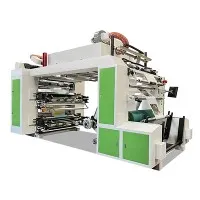
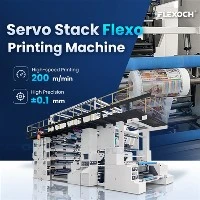
Hey there! As an inline flexo supplier, I've seen my fair share of waste in the printing industry. It's not just bad for the environment; it hits your bottom line hard, too. So, in this blog post, I'm gonna share some tips on how to reduce the waste rate of inline flexo printing.


1. Proper Pre - press Preparation
The first step to reducing waste in inline flexo printing is getting everything right in the pre - press stage. This includes accurate file setup, screening, and plate making.
When setting up your files, make sure all the dimensions, resolutions, and color profiles are spot - on. A single mistake in these details can lead to a whole batch of printed materials being rejected. You don't want to waste time, ink, and substrates on something that isn't going to meet the specifications.
Regarding screening, choosing the right screen frequency and angle is crucial. A wrong screen can cause issues like moiré patterns, which means you'll have to reprint the job. It's worth spending the extra time to test different screening options to find the best one for your specific project.
For plate making, high - quality plates are a must. Low - grade plates can wear out quickly, leading to inconsistent printing and more waste. Invest in good plates and make sure they are properly mounted on the printing cylinders. This helps ensure a smooth and accurate transfer of ink onto the substrate.
We offer high - quality inline flexo solutions that are designed to work seamlessly with proper pre - press preparation.
2. Optimize Ink Usage
Ink is one of the most significant costs in inline flexo printing, and overusing it leads to not only higher expenses but also more waste. One way to optimize ink usage is through proper ink mixing. Make sure you're mixing the right colors in the right proportions. Over - mixing or under - mixing can result in incorrect color matches, and you'll end up having to reprint the job.
Use ink measurement devices to ensure accurate amounts of ink are being applied. These devices can help you fine - tune the ink flow, making sure that just the right amount of ink is on the substrate. Also, consider ink recycling. Some modern inline flexo printing machines have ink recycling systems. These systems can collect the excess ink and reuse it for future jobs, reducing waste and saving costs.
We have Paper Bag Flexo Printing Machine models equipped with advanced ink management systems that can help you regulate and recycle ink effectively.
3. Machine Maintenance
A well - maintained inline flexo printing machine is less likely to produce waste. Regular maintenance is essential to keep the machine running smoothly and accurately.
First, clean the machine regularly. Ink residue, dust, and debris can build up over time and affect the quality of the print. Clogged nozzles, dirty rollers, and contaminated anilox rolls can all lead to uneven ink transfer and poor print quality. Use the right cleaning agents and follow the manufacturer's guidelines for cleaning.
Check and replace worn - out parts promptly. Components like doctor blades, gears, and bearings can wear down with use. If these parts are not replaced in time, they can cause problems such as inconsistent printing pressure, misregistration, and ink splatters. Regularly lubricate the moving parts to reduce friction and prevent premature wear.
We provide comprehensive maintenance services for our inline flexographic printing machines to ensure they are always in top - notch condition.
4. Operator Training
Your operators play a critical role in reducing waste. Make sure they are well - trained in operating the inline flexo printing machine. A skilled operator knows how to adjust the machine settings correctly, troubleshoot common issues, and make quick decisions to prevent waste.
Training should cover all aspects of the printing process, from pre - press to post - press. Operators should understand how to set up the machine for different substrates, inks, and print jobs. They should also be trained in quality control, so they can identify and correct problems before a large number of defective prints are produced.
We offer training programs for operators who use our inline flexo printing machines. Our experienced technicians will teach them everything they need to know to operate the machines efficiently and minimize waste.
5. Substrate Selection and Handling
Using the right substrate is essential for reducing waste. Different substrates have different properties, and you need to choose the one that is best suited for your print job. For example, if you're printing on a very thin substrate, it may be more prone to tear or wrinkle during the printing process, leading to waste.
Proper substrate handling is also crucial. Store the substrate in a suitable environment to prevent damage from humidity, temperature changes, or physical impact. Before loading the substrate onto the machine, check it for any defects. A defective substrate can cause problems during printing and result in waste.
When handling the substrate on the machine, make sure it is fed smoothly and accurately. Misaligned or wrinkled substrates can lead to misregistration and poor print quality. Adjust the tension settings on the machine to ensure the substrate moves through the printing process without any issues.
6. Quality Control
Implement a strict quality control system to catch any issues early in the printing process. Inspect the prints regularly during production. You can use both automated inspection systems and manual checks. Automated systems can detect defects such as color variations, missing elements, and registration errors. Manual checks can be used to catch any issues that the automated system may miss, like surface defects or tactile issues.
Set up quality control checkpoints at different stages of the printing process. For example, check the pre - press files, the plates, the initial test prints, and the final production runs. If a defect is detected, stop the production immediately and make the necessary adjustments. This way, you can prevent a large number of defective prints from being produced, reducing waste.
7. Data Monitoring and Analysis
Use data monitoring tools to track the performance of your inline flexo printing machine. These tools can collect data on various parameters such as ink consumption, printing speed, registration accuracy, and substrate usage. By analyzing this data, you can identify trends and patterns that may be contributing to waste.
For example, if you notice that the ink consumption is increasing over time, it could indicate a problem with the ink delivery system or the printing process. You can then take corrective action to address the issue before it leads to more waste. Data analysis can also help you optimize your printing processes by identifying areas where you can improve efficiency and reduce costs.
Conclusion
Reducing the waste rate of inline flexo printing is not only good for the environment but also for your business. By following these tips on proper pre - press preparation, optimizing ink usage, machine maintenance, operator training, substrate selection and handling, quality control, and data monitoring and analysis, you can significantly cut down on waste.
If you're interested in learning more about our inline flexo printing solutions and how they can help you reduce waste, please don't hesitate to reach out. We're here to assist you in making your printing operations more efficient and sustainable.
References
- Flexographic Printing Technical Association (FTA) publications on printing efficiency.
- Industry whitepapers on waste reduction in flexo printing.