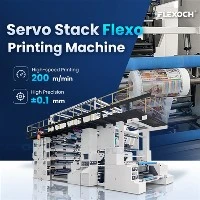
Adjusting the contrast of prints in a paper printing machine is a crucial aspect that can significantly impact the quality of the final printed product. As a reputable paper printing machine supplier, we understand the importance of achieving optimal contrast for various printing applications. In this blog post, we will delve into the methods and techniques to adjust the contrast of prints in a paper printing machine, ensuring that your prints stand out with sharp and vivid visuals.
Understanding Contrast in Printing
Before we explore the adjustment methods, it's essential to understand what contrast means in the context of printing. Contrast refers to the difference between the lightest and darkest areas of an image or text on the printed paper. High contrast means a significant difference between the light and dark tones, resulting in sharp and distinct visuals. On the other hand, low contrast can make the print appear dull and lackluster.


Factors Affecting Print Contrast
Several factors can influence the contrast of prints in a paper printing machine. These include:
- Ink Quality and Quantity: The type and quality of ink used, as well as the amount applied to the paper, can have a direct impact on contrast. Different inks have varying levels of opacity and color intensity, which can affect how the light and dark areas of the print are perceived.
- Paper Type: The surface texture, absorbency, and brightness of the paper can also influence contrast. Glossy papers tend to reflect more light, resulting in higher contrast, while matte papers may absorb more light, leading to lower contrast.
- Printing Settings: The settings on the printing machine, such as print density, dot gain, and screen ruling, can all affect the contrast of the prints. Adjusting these settings can help optimize the contrast for different printing jobs.
- Image Resolution: The resolution of the image being printed can also impact contrast. Higher resolution images generally have more detail and can produce better contrast, while lower resolution images may appear pixelated and have reduced contrast.
Methods for Adjusting Print Contrast
Now that we understand the factors affecting print contrast, let's explore some methods for adjusting it in a paper printing machine.
1. Adjusting Ink Settings
One of the most straightforward ways to adjust print contrast is by modifying the ink settings on the printing machine. This can be done by:
- Ink Density: Increasing the ink density can make the dark areas of the print appear darker, thereby increasing contrast. However, be careful not to overdo it, as too much ink can cause smudging and other print quality issues.
- Ink Balance: Ensuring that the ink balance between the different colors is correct is also important for achieving optimal contrast. Adjusting the ink levels for each color can help create a more balanced and visually appealing print.
2. Changing Paper Type
As mentioned earlier, the type of paper used can have a significant impact on print contrast. If you're experiencing low contrast, try switching to a different paper type. For example, using a glossy paper instead of a matte paper can often result in higher contrast prints.
3. Adjusting Printing Settings
The printing settings on the machine can also be adjusted to optimize print contrast. Some of the settings that can be modified include:
- Print Density: Similar to adjusting the ink density, increasing the print density can enhance contrast. However, this should be done in conjunction with other adjustments to avoid overprinting.
- Dot Gain: Dot gain refers to the increase in the size of the printed dots as they transfer from the printing plate to the paper. Adjusting the dot gain settings can help control the amount of ink transferred and improve contrast.
- Screen Ruling: The screen ruling determines the number of dots per inch (dpi) used in the printing process. A higher screen ruling can result in finer details and better contrast, but it may also require more ink and longer printing times.
4. Image Editing
Before printing, you can also edit the image to enhance its contrast. This can be done using image editing software such as Adobe Photoshop. By adjusting the levels, curves, or contrast settings in the software, you can increase the difference between the light and dark areas of the image, resulting in a more contrasted print.
Using Advanced Printing Technologies
In addition to the above methods, some advanced printing technologies can also help improve print contrast. For example, inline flexo printing is a high-quality printing method that can produce sharp and vivid prints with excellent contrast. The Paper Bag Flexo Printing Machine and inline flexographic printing technology used in these machines allow for precise control of the ink application, resulting in consistent and high-contrast prints.
Troubleshooting Low Contrast Prints
If you're still experiencing low contrast prints after trying the above methods, there may be other issues at play. Here are some common problems and their solutions:
- Dirty Printing Plates: Dirty printing plates can cause uneven ink transfer, resulting in low contrast prints. Clean the printing plates regularly to ensure optimal print quality.
- Worn Printing Components: Worn or damaged printing components, such as rollers and blankets, can also affect print contrast. Replace any worn components as needed to maintain consistent print quality.
- Incorrect Color Calibration: If the colors on the print are not accurate, it can also affect contrast. Make sure to calibrate the printing machine regularly to ensure accurate color reproduction.
Conclusion
Adjusting the contrast of prints in a paper printing machine is a complex process that requires a combination of technical knowledge and practical experience. By understanding the factors affecting print contrast and using the methods and techniques outlined in this blog post, you can achieve optimal contrast for your prints, resulting in high-quality and visually appealing products.
As a leading paper printing machine supplier, we are committed to providing our customers with the latest printing technologies and solutions to help them achieve the best possible print quality. If you have any questions or need further assistance with adjusting the contrast of your prints, please don't hesitate to [contact us for a purchase consultation]. We look forward to working with you to meet your printing needs.
References
- "Printing Technology Handbook" by John Smith
- "Color Management in Printing" by Jane Doe
- "Advanced Printing Techniques" by Robert Johnson