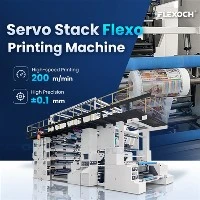
Flexo printing presses are widely used in the packaging and printing industry due to their versatility, efficiency, and high - quality output. One crucial aspect of operating a flexo printing press is adjusting the pressure accurately. As a supplier of flexo printing presses, I'd like to share some in - depth knowledge on how to adjust the pressure on a flexo printing press.
Importance of Pressure Adjustment in Flexo Printing
Pressure adjustment in a flexo printing press is of utmost significance. Incorrect pressure can lead to a variety of printing defects. For example, if the pressure is too high, it may cause excessive ink transfer, resulting in unclear images, spreading of colors, and even damage to the printing plates and anilox rollers. On the other hand, insufficient pressure can lead to poor ink transfer, inconsistent color density, and missing details in the printed image. Therefore, achieving the proper pressure is essential for producing high - quality printed products.
Understanding the Different Pressure Zones in a Flexo Printing Press
-
Anilox Roller to Printing Plate Pressure
The anilox roller is responsible for metering the ink and transferring it to the printing plate. The pressure between the anilox roller and the printing plate should be carefully adjusted. To measure this pressure, we usually use a pressure - sensitive paper. Place the pressure - sensitive paper between the anilox roller and the printing plate and run the press at a low speed. The color change on the pressure - sensitive paper indicates the pressure distribution.
The ideal pressure should ensure uniform ink transfer from the anilox roller to the printing plate. Too much pressure will flatten the cells of the anilox roller, resulting in incorrect ink metering. In contrast, too little pressure may cause incomplete ink transfer from the anilox cells to the printing plate.
- Printing Plate to Substrate Pressure
The pressure between the printing plate and the substrate is crucial for transferring the ink from the printing plate to the final product. This pressure depends on the type of substrate. For example, a corrugated board may require higher pressure compared to a thin paper.
We also use pressure - sensitive paper to measure this pressure. The goal is to achieve a clear and consistent transfer of the printed image onto the substrate. If the pressure is not evenly distributed, some areas of the image may be faint or missing, while other areas may be over - printed.
Steps to Adjust the Pressure
- Initial Setup and Inspection
Before starting the pressure adjustment, ensure that all the components of the flexo printing press are clean and in good condition. Check the anilox roller for any damage or blockages, and make sure the printing plate is properly mounted. Also, inspect the substrate feeding system to ensure smooth substrate movement. - Anilox to Plate Pressure Adjustment
- First, operate the press at a low speed and measure the initial pressure using the pressure - sensitive paper. Observe the color density and distribution on the paper.
- If the pressure is uneven, adjust the pressure at the bearings or the hydraulic cylinders of the anilox roller. For a hydraulic system, use the control panel to increase or decrease the pressure gradually. For mechanical systems, use wrenches to adjust the nuts or bolts that control the pressure.
- Continuously measure the pressure using the pressure - sensitive paper until a uniform pressure distribution is achieved. This may take several attempts, as small adjustments can make a significant difference.
- Plate to Substrate Pressure Adjustment
- Similar to the anilox - to - plate pressure adjustment, start by measuring the current pressure with pressure - sensitive paper. Pay close attention to the edges and corners of the printed area, as these are often the areas where pressure imbalances are most pronounced.
- Adjust the pressure using the pressure adjustment mechanisms of the printing plate cylinder. If the substrate is thin and flexible, small pressure adjustments may be sufficient. However, for thicker and more rigid substrates, more substantial adjustments may be needed.
- Keep testing with the pressure - sensitive paper and making further adjustments until the printed image on the substrate shows consistent color density and sharp details.
-


Factors Affecting Pressure Adjustment
- Substrate Properties
The thickness, smoothness, and absorbency of the substrate have a significant impact on pressure adjustment. For instance, a rough - surfaced substrate may require more pressure to ensure proper ink transfer compared to a smooth - surfaced one. A highly absorbent substrate may also need more pressure to push the ink into the substrate fibers. - Printing Plate Characteristics
The hardness and design of the printing plate play a role in pressure adjustment. Softer plates may require less pressure to transfer the ink, while harder plates may need more pressure. Additionally, plates with fine details or high - relief areas may need more precise pressure adjustment to ensure all details are printed clearly. - Ink Viscosity
The viscosity of the ink affects how easily it can be transferred between the anilox roller, the printing plate, and the substrate. Higher - viscosity inks may require more pressure to flow and transfer properly, while lower - viscosity inks may need less pressure.
Advanced Pressure Adjustment Techniques
- Automated Pressure Control Systems
Many modern flexo printing presses are equipped with automated pressure control systems. These systems use sensors to measure the pressure in real - time and adjust it automatically to maintain a consistent pressure throughout the printing process. This technology reduces the need for manual adjustments, improves printing quality, and increases production efficiency. - Digital Imaging and Monitoring
Digital imaging systems can be used to monitor the printed output continuously. By analyzing the digital images, operators can detect any pressure - related defects early and make adjustments accordingly. This technology also allows for more accurate pressure adjustments based on objective data rather than subjective visual inspection.
We Are Your Professional Partner in Flexo Printing
As a leading supplier of flexo printing presses, we offer a wide range of products to meet different printing needs. Our Paper Cup Flexo Printing Machine is designed specifically for printing on paper cups, with advanced pressure adjustment features to ensure high - quality cup printing. If you are looking for a machine to print on paper rolls, our Paper Flexo Printing Machine is an excellent choice. It provides precise pressure control for consistent and detailed printing. For those who require more advanced and flexible printing solutions, our Gearless Flexo Printing Machine offers superior performance with its gearless design and advanced pressure adjustment capabilities.
If you are interested in our flexo printing presses or need more information about pressure adjustment and other technical aspects, please don't hesitate to contact us. We have a team of experienced professionals who can provide you with detailed product information, technical support, and help you choose the most suitable machine for your business. Start your high - quality printing journey with us today!
Video Introduction
References
- "Flexographic Printing Technology" by Thomas W. Faris
- "The Handbook of Flexographic Printing" edited by George T. Sampson
- Industry whitepapers on flexo printing press operation and maintenance.