


Hey there! As a supplier of Non Woven Flexo Printing Machines, I've seen firsthand how the wear and tear of key components can be a real headache for users. It not only affects the performance of the machine but also increases maintenance costs and downtime. So, in this blog, I'm gonna share some practical tips on how to reduce the wear and tear of these key components.
Understanding the Key Components
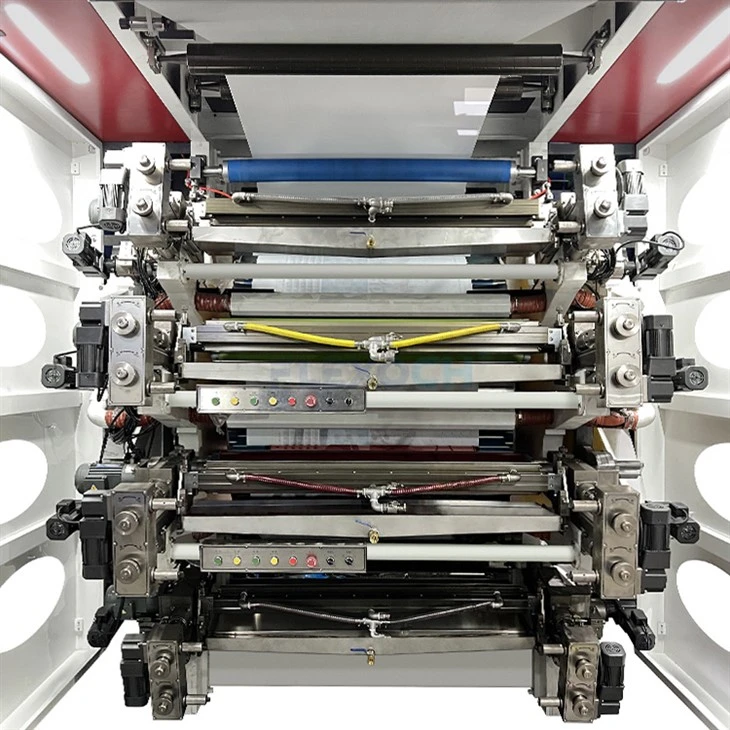
Before we dive into the ways to reduce wear and tear, let's first understand the key components of a Non Woven Flexo Printing Machine. These machines typically consist of several important parts, including the printing cylinders, anilox rollers, doctor blades, gears, and motors. Each of these components plays a crucial role in the printing process, and any damage or excessive wear can lead to poor print quality and machine malfunctions.
Printing Cylinders
The printing cylinders are responsible for transferring the ink from the anilox rollers to the non - woven material. They are often made of high - quality steel or aluminum. Over time, the surface of the printing cylinders can get scratched or worn, which affects the ink transfer and print sharpness.

Anilox Rollers
Anilox rollers are used to meter the ink onto the printing cylinders. They have tiny cells on their surface that hold the ink. If the anilox rollers are not properly maintained, these cells can get clogged, reducing the ink transfer efficiency.
Doctor Blades
Doctor blades are used to scrape off the excess ink from the anilox rollers. They are in constant contact with the anilox rollers, and thus, are prone to wear. A worn - out doctor blade can cause uneven ink distribution and streaks on the printed material.
Gears
Gears are used to transmit power and motion within the machine. They are subject to high stress and friction, and if not lubricated properly, can wear out quickly.
Motors
Motors provide the power for the machine to operate. Overheating and excessive vibration can cause damage to the motor components, leading to reduced performance and potential breakdowns.
Tips to Reduce Wear and Tear
Regular Cleaning
One of the most important things you can do to reduce wear and tear is to keep the machine clean. After each printing job, make sure to clean the printing cylinders, anilox rollers, and doctor blades. Use a suitable cleaning solution to remove the ink residues. For the anilox rollers, you can use a specialized anilox cleaner to unclog the cells. Regular cleaning not only extends the lifespan of these components but also ensures consistent print quality.
Proper Lubrication
Lubrication is key when it comes to reducing friction and wear in gears and moving parts. Check the lubrication levels regularly and use the recommended lubricants for each component. Over - lubrication can also be a problem, as it can attract dirt and debris, so make sure to follow the manufacturer's guidelines.
Correct Installation and Alignment
During the installation of the machine, ensure that all components are correctly installed and aligned. Misaligned components can cause uneven stress and wear. For example, if the printing cylinders are not properly aligned, it can lead to uneven ink transfer and premature wear of the cylinders.
Temperature and Humidity Control
The operating environment of the machine can have a significant impact on the wear and tear of its components. High temperatures can cause the materials to expand and deform, while high humidity can lead to corrosion. Try to maintain a stable temperature and humidity level in the printing area. You can use air - conditioning and dehumidifiers to achieve this.
Operator Training
Well - trained operators are less likely to cause damage to the machine. Provide comprehensive training to your operators on how to operate the machine correctly, including loading the materials, adjusting the settings, and performing routine maintenance. Encourage them to report any abnormal noises or vibrations immediately.
The Role of High - Quality Components
Investing in high - quality components can also significantly reduce wear and tear. At our company, we offer a range of top - notch components for our Non Woven Flexo Printing Machines. For example, our Double Station Non-stop CI Flexographic Printer is equipped with high - precision printing cylinders and anilox rollers that are designed to withstand heavy use. Our Non Woven Flexo Printing Machine uses advanced doctor blades that have a longer lifespan and provide better ink control. And our Gearless Flexo Printing Machine reduces the wear associated with traditional gears by using a gearless design.
Monitoring and Predictive Maintenance
Implementing a monitoring system can help you detect early signs of wear and tear. You can use sensors to monitor the temperature, vibration, and performance of key components. By analyzing the data collected from these sensors, you can predict when a component is likely to fail and perform preventive maintenance. This approach can save you a lot of money in the long run by avoiding unexpected breakdowns and costly repairs.
Conclusion
Reducing the wear and tear of key components in a Non Woven Flexo Printing Machine is essential for maintaining its performance and reducing operating costs. By following the tips mentioned above, such as regular cleaning, proper lubrication, correct installation, and temperature control, you can extend the lifespan of your machine's components. And don't forget the importance of investing in high - quality components and implementing a monitoring system.
If you're interested in our Non Woven Flexo Printing Machines or need more information on how to reduce wear and tear, feel free to reach out to us for a purchase negotiation. We're here to help you get the most out of your printing equipment.
References
- "Flexographic Printing Technology Handbook" by Thomas F. Goss
- "Maintenance and Troubleshooting of Printing Machines" by John Doe


