When it comes to the world of paper printing, one of the most frequently asked questions by our clients is about the printing speed for high - resolution images in a paper printing machine. As a trusted paper printing machine supplier, we understand that this aspect is crucial for businesses aiming to balance quality and efficiency.
Understanding High - Resolution Printing
High - resolution images are characterized by a large number of pixels, which enables them to display intricate details, sharp edges, and a wide range of colors. In the paper printing context, high - resolution printing generally refers to achieving a high dots - per - inch (DPI) output. For example, photographic prints often require 300 DPI or higher to maintain their visual quality. When printing high - resolution images on paper, every pixel needs to be accurately transferred onto the paper surface. This means that the printer has to manage a significant amount of data and execute precise printing actions.
Factors Affecting Printing Speed for High - Resolution Images
1. Printing Technology
There are several printing technologies available in the market, each with its own performance characteristics. For instance, inkjet printers operate by ejecting tiny droplets of ink onto the paper. When dealing with high - resolution images, these printers need to eject a large number of ink droplets in a precise pattern. This can slow down the printing process, especially for larger images or high - density designs.
On the other hand, laser printers use a laser beam to create an electrostatic image on a drum, which then attracts toner particles that are transferred to the paper. Laser printers are generally faster at printing text and simple graphics, but they also have limitations when it comes to high - resolution images. The complexity of the image and the need to precisely control the laser beam can reduce the printing speed.
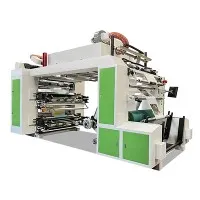
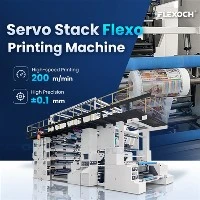
Flexographic printing, such as inline flexo and inline flexographic printing, is another popular option. Flexo printers use flexible relief plates to transfer ink to the substrate. They are known for their relatively high - speed operation, even for high - resolution images. This is because the printing plates can be customized to handle detailed graphics, and modern flexo presses are equipped with advanced control systems that optimize the printing process.
2. Paper Quality and Type
The type of paper used also has a significant impact on the printing speed of high - resolution images. Different papers have different absorbency rates, surface smoothness, and thickness. For example, smooth, high - quality coated papers can absorb ink more evenly, which is beneficial for high - resolution printing. However, the printer may need to adjust the ink deposit and drying time to avoid smudging or uneven printing.
On the other hand, uncoated papers are more porous and can absorb ink quickly but may not provide the same level of color vibrancy or sharpness as coated papers. Printers may need to print multiple passes or use less ink for a more controlled application, which can slow down the process. Additionally, thick papers may require more time for the printer to handle and may cause more mechanical stress during the printing process, reducing the overall speed.
3. Image Complexity
The complexity of the high - resolution image itself is a determining factor for printing speed. An image with a simple design, such as a single - color logo, will print much faster than a full - color, multi - layered photograph with fine details and gradients. Images with a high level of detail require the printer to make more precise movements and apply more ink in specific areas.
For example, an image with complex patterns or a lot of small text within a high - resolution graphic will take longer to print as the printer needs to ensure accurate reproduction of each element. Moreover, if the image contains a large number of colors, the printer may need to perform multiple color passes, further increasing the printing time.
Typical Printing Speeds in the Market
The printing speed for high - resolution images can vary widely depending on the factors mentioned above. In general, small - scale desktop printers designed for home or office use may have a printing speed of around 10 - 20 pages per minute (PPM) for high - resolution color images. These printers are usually inkjet or small laser models and are suitable for low - volume, occasional printing tasks.
For commercial printing machines, the speed can be significantly higher. High - end Paper Bag Flexo Printing Machine can achieve speeds of 100 - 300 meters per minute or more, depending on the specific model and configuration. These machines are designed for large - scale production and can handle high - resolution printing with relative efficiency. They often incorporate advanced technologies such as quick - drying systems, automated printing plate changes, and high - speed ink transfer mechanisms.
Optimizing Printing Speed for High - Resolution Images
As a paper printing machine supplier, we offer several solutions to help our clients optimize the printing speed for high - resolution images.
1. Choosing the Right Machine
Selecting the appropriate printing machine based on your specific needs is crucial. If you are a small business or a startup with low - volume printing requirements, a desktop inkjet or laser printer may be sufficient. However, for large - scale production, a flexographic or offset printing press may be a better choice. Our team of experts can assist you in evaluating your production volume, image complexity, and budget to recommend the most suitable machine.
2. Pre - processing the Images
Before sending the high - resolution images to the printer, it is advisable to pre - process them. This can include resizing the image to the appropriate dimensions, adjusting the color balance, and compressing the file size without sacrificing too much quality. By reducing the amount of data the printer needs to process, you can potentially speed up the printing process.


3. Regular Maintenance
Proper maintenance of the printing machine is essential for optimal performance. This includes cleaning the print heads, replacing worn - out components, and ensuring that the machine is calibrated correctly. Regular maintenance can prevent issues such as clogged nozzles or misaligned printing plates, which can slow down the printing process and affect the quality of the output.
Conclusion
In conclusion, the printing speed for high - resolution images in a paper printing machine is influenced by multiple factors, including printing technology, paper quality, and image complexity. As a paper printing machine supplier, we are committed to providing our clients with the best solutions to balance printing speed and image quality. Whether you are a small business looking to print promotional materials or a large - scale manufacturer in need of high - volume production, we have the expertise and technology to meet your requirements.
If you are interested in learning more about our paper printing machines or have any questions regarding the printing speed for high - resolution images, we encourage you to reach out to us for a consultation. Our professional team is ready to assist you in finding the most suitable printing solution for your business.
References
- Smith, J. (2020). Printing Technologies: A Comprehensive Guide. New York: Printing Press Inc.
- Johnson, A. (2019). The Impact of Paper Quality on Printing Performance. Journal of Printing Science, 15(2), 45 - 56.
- Brown, C. (2021). Optimizing Printing Speed for High - Resolution Images. International Journal of Printing Technology, 22(3), 78 - 89.