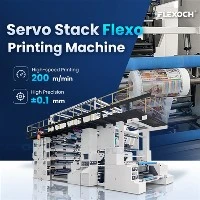
In the realm of woven sack production, flexo printing machines play a pivotal role in adding vibrant and detailed designs to the sacks. However, one common challenge that operators often face is ink splashing. Ink splashing not only affects the quality of the printed sacks but also leads to wastage of ink and can cause a messy working environment. As a leading supplier of Woven Sack Flexo Printing Machines, we understand the significance of this issue and have gathered some effective strategies to prevent ink splashing.
Understanding the Causes of Ink Splashing
Before delving into the prevention methods, it is essential to understand the root causes of ink splashing. Several factors can contribute to this problem, including:
- Incorrect Ink Viscosity: If the ink is too thin, it is more likely to splash during the printing process. On the other hand, if the ink is too thick, it may not flow smoothly, leading to uneven printing and potential splashing.
- High Printing Speed: Running the printing machine at an excessively high speed can cause the ink to be thrown off the printing plates or rollers, resulting in splashing.
- Worn-out Printing Components: Over time, the printing plates, rollers, and doctor blades can wear out, causing uneven ink distribution and increasing the risk of splashing.
- Improper Machine Setup: Incorrect alignment of the printing components, such as the anilox roller and the printing plate, can lead to ink splashing.
-
 Central Drum
 Chamber Doctor Blade
 Anilox Roller
Strategies to Prevent Ink Splashing
1. Control Ink Viscosity
Maintaining the correct ink viscosity is crucial for preventing ink splashing. The viscosity of the ink should be adjusted according to the printing speed, substrate type, and environmental conditions. Here are some tips to control ink viscosity:
- Use a Viscosity Cup: Regularly measure the ink viscosity using a viscosity cup to ensure it falls within the recommended range.
- Add Thickeners or Thinners: If the ink is too thin, add a suitable thickener to increase its viscosity. Conversely, if the ink is too thick, add a thinner to reduce its viscosity.
- Monitor Temperature and Humidity: Temperature and humidity can affect the viscosity of the ink. Keep the printing environment at a stable temperature and humidity level to prevent fluctuations in ink viscosity.
2. Optimize Printing Speed
Running the printing machine at an appropriate speed is essential for preventing ink splashing. While higher printing speeds can increase productivity, they also increase the risk of ink splashing. Here are some guidelines to optimize printing speed:
- Start at a Low Speed: When starting a new printing job, begin at a low speed and gradually increase it as the printing process stabilizes.
- Monitor the Printing Quality: Continuously monitor the quality of the printed sacks to ensure that the printing speed is not causing ink splashing. If splashing occurs, reduce the printing speed.
- Consider the Substrate and Ink Type: Different substrates and ink types may require different printing speeds. Consult the ink manufacturer's recommendations and conduct test runs to determine the optimal printing speed for your specific application.
3. Maintain Printing Components
Regular maintenance of the printing components is essential for preventing ink splashing. Worn-out or damaged components can cause uneven ink distribution and increase the risk of splashing. Here are some maintenance tips:
-
Inspect and Replace Printing Plates: Regularly inspect the printing plates for signs of wear and tear, such as scratches or cracks. Replace any damaged plates promptly to ensure consistent ink transfer.
Clean and Maintain Rollers: Clean the anilox roller, printing roller, and doctor blade regularly to remove any ink buildup or debris. Lubricate the rollers as recommended by the machine manufacturer to ensure smooth operation.
Adjust Doctor Blade Pressure: The doctor blade plays a crucial role in controlling the amount of ink transferred to the printing plate. Adjust the doctor blade pressure to ensure that it is evenly distributed and not causing excessive ink splashin.

- 4. Ensure Proper Machine Setup
Proper machine setup is essential for preventing ink splashing. Incorrect alignment of the printing components can cause uneven ink distribution and increase the risk of splashing. Here are some setup tips:
- Align Printing Components: Ensure that the anilox roller, printing plate, and doctor blade are properly aligned. Use alignment tools and follow the machine manufacturer's instructions to achieve accurate alignment.
- Check Ink Supply System: Inspect the ink supply system, including the ink pump, hoses, and valves, to ensure that it is functioning properly. Leaks or blockages in the ink supply system can cause ink splashing.
- Calibrate the Printing Machine: Regularly calibrate the printing machine to ensure that it is operating at the correct settings. This includes adjusting the ink flow, pressure, and registration.
5. Use Splash Guards and Enclosures
Installing splash guards and enclosures around the printing machine can help prevent ink splashing. Splash guards are typically made of plastic or metal and are designed to catch any ink that may be thrown off the printing components. Enclosures provide a more comprehensive solution by completely enclosing the printing machine, preventing ink from escaping into the surrounding environment. Here are some benefits of using splash guards and enclosures:
- Reduce Ink Wastage: By catching the splashed ink, splash guards and enclosures help reduce ink wastage, saving costs in the long run.
- Improve Workplace Safety: Ink splashing can create a slippery and hazardous working environment. Splash guards and enclosures help prevent ink from spilling onto the floor, reducing the risk of slips and falls.
- Enhance Print Quality: By preventing ink from splashing onto the printed sacks, splash guards and enclosures help improve the overall print quality.
Conclusion
Ink splashing is a common problem in Woven Sack Flexo Printing Machines, but it can be effectively prevented by implementing the strategies outlined in this blog. By controlling ink viscosity, optimizing printing speed, maintaining printing components, ensuring proper machine setup, and using splash guards and enclosures, you can minimize ink splashing, improve print quality, and increase productivity.
As a trusted supplier of Woven Sack Flexo Printing Machines, we are committed to providing our customers with high-quality machines and comprehensive support. Our Gearless flexo printing press and Economical CI Printing Machine are designed to meet the diverse needs of the woven sack printing industry. If you have any questions or need further assistance in preventing ink splashing or choosing the right printing machine for your business, please do not hesitate to contact us. We look forward to working with you to achieve your printing goals.


References
- Flexographic Printing Technical Association (FPTA). (2023). Flexo Printing Best Practices Guide.
- Ink Manufacturers' Technical Bulletins. (2023). Available from various ink manufacturers.
- Woven Sack Flexo Printing Machine User Manuals. (2023). Available from machine manufacturers.