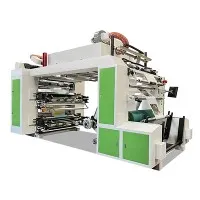
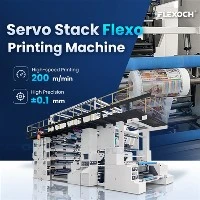
Hey there! I'm a supplier of inline flexo equipment, and I know how crucial it is to achieve top - notch color density in inline flexo printing. In this blog, I'll share some practical tips on how you can improve color density in your inline flexo printing process.
First off, let's understand what inline flexo printing is. Inline flexo, or inline flexographic printing, is a popular printing method that offers high - speed production and the ability to print on a variety of substrates. It's widely used in industries like packaging, where vibrant and consistent colors are a must.
1. Ink Selection and Management
The ink you choose plays a huge role in determining color density. You need to pick an ink that's specifically formulated for inline flexo printing. High - quality inks with a high pigment concentration are more likely to produce better color density. For example, solvent - based inks often provide better color saturation compared to water - based inks, but they also come with environmental and safety concerns. So, it's a balance you need to strike.
Ink viscosity is another critical factor. If the ink is too thick, it won't transfer properly from the anilox roll to the printing plate, resulting in poor color density. On the other hand, if it's too thin, the ink might spread too much, causing blurry prints. You should regularly measure and adjust the ink viscosity using a viscometer. Keep the ink at the recommended viscosity range specified by the ink manufacturer.
Also, make sure to keep your ink well - mixed. Settling of pigments can lead to inconsistent color density. Use an ink agitator to keep the pigments evenly distributed in the ink.
2. Anilox Roll Selection and Maintenance
The anilox roll is like the heart of the inline flexo printing process. It transfers the ink from the ink fountain to the printing plate. The cell volume and the line count of the anilox roll have a direct impact on color density.
A higher cell volume anilox roll can hold more ink, which generally leads to higher color density. However, a very high cell volume might also cause over - inking and other printing defects. So, you need to choose the right anilox roll based on the type of ink, substrate, and the desired print quality.
The line count of the anilox roll affects the fineness of the ink transfer. A lower line count means larger cells, which can transfer more ink but might result in a coarser print. A higher line count gives a finer ink transfer but may reduce the overall color density. You'll need to experiment to find the sweet spot for your specific printing job.
Regular maintenance of the anilox roll is essential. Over time, the cells can get clogged with dried ink and debris, which reduces the ink transfer efficiency and color density. Clean the anilox roll regularly using appropriate cleaning agents and methods. Ultrasonic cleaning is a popular and effective way to remove stubborn ink deposits from the anilox cells.


3. Printing Plate Quality
The quality of the printing plate is crucial for achieving good color density. A well - made printing plate with sharp and clean image areas will transfer the ink more effectively. Make sure to use high - quality photopolymer plates that are designed for inline flexo printing.
The durometer (hardness) of the printing plate also matters. A softer plate can conform better to the substrate, which can improve ink transfer and color density. However, a plate that's too soft might wear out quickly. So, choose a plate with the right durometer for your application.
When mounting the printing plate on the plate cylinder, make sure it's properly aligned and tensioned. Any misalignment or uneven tension can lead to inconsistent ink transfer and poor color density.
4. Substrate Considerations
The substrate you're printing on can significantly affect color density. Different substrates have different surface characteristics, such as porosity, smoothness, and absorbency.
A porous substrate, like paper, will absorb the ink more readily. This can be an advantage as it helps in achieving good color density, but it also means that the ink might spread more, causing a loss of sharpness. You might need to adjust the ink formulation or the printing pressure to get the best results.
Smooth substrates, like plastic films, require a different approach. They don't absorb the ink as well, so you need to ensure good ink adhesion. You might need to use a primer or a special ink that's designed for plastic substrates to improve color density.
Also, make sure the substrate is clean and free from dust and contaminants. Any dirt on the substrate can prevent proper ink transfer, leading to poor color density.
5. Printing Pressure and Registration
Proper printing pressure is essential for achieving consistent color density. If the pressure is too low, the ink won't transfer properly from the printing plate to the substrate, resulting in light prints. If the pressure is too high, it can damage the printing plate and the substrate, and also cause ink spreading.
You need to find the optimal printing pressure for each job. This usually involves some trial and error. Start with a low pressure and gradually increase it while monitoring the print quality. Look for a balance where the ink is transferred evenly and the color density is consistent across the print.
Registration is also important. If the printing plates are not properly registered, the colors won't align correctly, and it can give the impression of poor color density. Make sure to use a good registration system and regularly check and adjust the registration during the printing process.
6. Machine Settings and Calibration
Your inline flexo printing machine needs to be properly calibrated and set up for optimal color density. The speed of the machine can affect color density. A higher printing speed might not allow enough time for the ink to transfer properly, resulting in lower color density. So, you might need to adjust the machine speed based on the ink, substrate, and other factors.
The temperature and humidity in the printing environment can also impact color density. High humidity can cause the ink to dry more slowly, which might lead to smudging and poor color density. On the other hand, low humidity can cause the ink to dry too quickly, making it difficult to transfer. Try to maintain a stable environment with controlled temperature and humidity.
Regularly calibrate your machine's sensors and controls. This ensures that all the components are working in sync and that the printing process is consistent.
7. Operator Training
Last but not least, well - trained operators are key to achieving good color density in inline flexo printing. An experienced operator can quickly identify and troubleshoot issues related to ink, anilox rolls, printing plates, and machine settings.
Provide comprehensive training to your operators on all aspects of inline flexo printing, including color management. Teach them how to adjust the machine settings, measure ink viscosity, and maintain the equipment properly. Encourage them to keep learning and stay updated on the latest printing technologies and best practices.
In conclusion, improving color density in inline flexo printing is a multi - faceted process. It involves careful selection and management of inks, anilox rolls, printing plates, and substrates, as well as proper machine setup and operator training. By following these tips, you can significantly enhance the color density of your inline flexo prints, leading to better - quality products and happier customers.
If you're in the market for a Paper Bag Flexo Printing Machine or other inline flexo equipment, or if you have any questions about improving color density in your inline flexo printing process, don't hesitate to reach out. We're here to help you take your printing to the next level.
Video introduction
References
- "Flexographic Printing: Principles and Practices" by James R. Fuchs
- "The Flexographic Printing Handbook" by Christopher P. Ciarlo
- Ink manufacturer's technical manuals
- Anilox roll manufacturer's guidelines