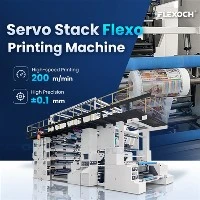
Operating a Woven Sack Flexo Printing Machine requires a combination of technical knowledge, practical skills, and attention to detail. As a supplier of these machines, I've witnessed firsthand the common mistakes that operators often make, which can lead to subpar print quality, increased downtime, and higher costs. In this blog post, I'll share some of the most prevalent errors and provide guidance on how to avoid them.
1. Neglecting Machine Maintenance
One of the most significant mistakes operators make is failing to perform regular maintenance on the Woven Sack Flexo Printing Machine. Over time, dust, ink residue, and other contaminants can accumulate on the machine's components, leading to mechanical issues and reduced print quality. For example, a build - up of ink on the anilox rollers can cause inconsistent ink transfer, resulting in uneven colors and blurred images.
To avoid this, it's essential to follow the manufacturer's recommended maintenance schedule. This includes daily cleaning of the ink systems, monthly lubrication of moving parts, and periodic inspection of critical components such as the printing cylinders and tension control systems. Additionally, operators should replace worn - out parts promptly to prevent further damage to the machine.
Video introduction
2. Improper Ink Management
Ink management is a crucial aspect of flexo printing. Using the wrong type of ink, incorrect ink viscosity, or improper ink mixing can all lead to printing problems. For instance, if the ink viscosity is too high, it may not flow smoothly through the ink system, causing ink starvation and incomplete coverage. On the other hand, if the viscosity is too low, the ink may spread too much, resulting in blurred edges.
To ensure proper ink management, operators should carefully select the ink based on the type of substrate and printing requirements. They should also regularly measure and adjust the ink viscosity using a viscometer. Proper ink mixing is also essential to maintain consistent color throughout the printing process. It's recommended to use a mechanical stirrer to ensure thorough mixing of the ink components.
3. Incorrect Registration Settings
Registration refers to the accurate alignment of different colors in a multi - color print job. Incorrect registration settings can result in misaligned colors, which is a major quality issue in woven sack printing. This can be caused by several factors, including improper tension control, worn - out gears, or inaccurate adjustment of the printing cylinders.
To achieve precise registration, operators should first ensure that the substrate is fed into the machine with consistent tension. They should also regularly check and adjust the registration settings using the machine's registration control system. If necessary, they can use registration marks on the substrate to verify the alignment of the colors. Additionally, operators should inspect the gears and other mechanical components for wear and tear and replace them as needed.
4. Poor Substrate Handling
The quality of the substrate can significantly impact the printing results. Using a low - quality substrate or mishandling the substrate during the printing process can lead to problems such as ink adhesion issues, wrinkling, and tearing. For example, if the substrate is too dry, the ink may not adhere properly, resulting in poor print quality.

Operators should carefully select the substrate based on its thickness, smoothness, and surface energy. They should also store the substrate in a controlled environment to prevent moisture absorption or drying out. During the printing process, operators should ensure that the substrate is fed into the machine smoothly and without any wrinkles. This can be achieved by using proper tension control and guiding systems.
5. Inadequate Operator Training
A lack of proper training is a common mistake that can have a significant impact on the performance of the Woven Sack Flexo Printing Machine. Operators who are not familiar with the machine's operation, maintenance, and troubleshooting procedures are more likely to make errors, which can lead to downtime and reduced productivity.
As a supplier, we offer comprehensive training programs for our customers' operators. These programs cover all aspects of the machine, including operation, maintenance, and troubleshooting. We also provide ongoing support and technical assistance to ensure that operators can handle any issues that may arise during the printing process.
6. Ignoring Environmental Factors
Environmental factors such as temperature and humidity can affect the performance of the flexo printing machine and the quality of the printed products. High temperatures can cause the ink to dry too quickly, leading to clogging of the ink systems and poor print quality. On the other hand, low humidity can cause static electricity, which can attract dust and affect the registration of the colors.
Operators should monitor and control the environmental conditions in the printing area. They can use air conditioning and humidification systems to maintain a stable temperature and humidity level. Additionally, they should use anti - static devices to reduce the impact of static electricity.
7. Not Using the Right Printing Plates
The quality of the printing plates is crucial for achieving high - quality prints. Using low - quality printing plates or plates that are not properly prepared can result in poor image reproduction, uneven ink transfer, and short plate life.
Operators should select high - quality printing plates that are suitable for the type of substrate and printing requirements. They should also follow the manufacturer's instructions for plate preparation, including exposure, development, and mounting. Additionally, operators should store the printing plates properly to prevent damage and ensure their longevity.
8. Overlooking Safety Precautions
Safety is of utmost importance when operating a Woven Sack Flexo Printing Machine. Operators who overlook safety precautions can put themselves and others at risk of injury. Common safety hazards include moving parts, electrical systems, and ink fumes.
Operators should always wear appropriate personal protective equipment (PPE), such as safety glasses, gloves, and earplugs. They should also follow the machine's safety procedures, including locking out the power supply before performing maintenance or cleaning. Additionally, operators should be aware of the potential health risks associated with ink fumes and ensure proper ventilation in the printing area.
Conclusion
Operating a Woven Sack Flexo Printing Machine successfully requires avoiding these common mistakes. By following proper maintenance procedures, managing ink correctly, setting accurate registration, handling substrates carefully, providing adequate training, considering environmental factors, using the right printing plates, and observing safety precautions, operators can achieve high - quality prints, reduce downtime, and increase productivity.
If you're in the market for a Woven Sack Flexo Printing Machine, we offer a range of high - quality machines, including the Double Station Non - stop CI Flexographic Printer, 4 Color Flexo Printing Machine, and CI Flexo Machine. Contact us to discuss your specific requirements and explore how our machines can meet your needs.


References
- Flexographic Printing Technical Association (FPTA) - Various publications on flexo printing technology and best practices.
- Manufacturer's manuals for Woven Sack Flexo Printing Machines.