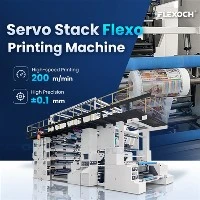
Calibrating a PE film printing machine is a crucial process that ensures high - quality printing results. As a PE Film Printing Machine supplier, I understand the importance of proper calibration for our customers. In this blog, I will guide you through the steps of calibrating a PE film printing machine, covering everything from pre - calibration checks to the final verification of the calibration.
Video Introduction
Pre - calibration Checks
Before starting the calibration process, it is essential to conduct a series of pre - calibration checks. These checks help identify any potential issues that could affect the calibration and ensure the machine is in good working condition.
Machine Inspection
First, visually inspect the entire printing machine. Check for any loose parts, damaged belts, or signs of wear and tear. Make sure all the screws and bolts are tightened properly. A loose part can cause vibrations during the printing process, which will lead to inaccurate printing. For example, if the printing cylinder is not firmly attached, it may rotate unevenly, resulting in blurred or misaligned prints.
Detail Image


Cleaning
Clean the machine thoroughly. Remove any dust, debris, or ink residues from the printing cylinders, anilox rollers, and other critical components. Ink residues can build up over time and affect the ink transfer, leading to inconsistent print quality. Use appropriate cleaning agents and tools recommended by the machine manufacturer. For instance, a soft brush can be used to clean the fine grooves of the anilox roller without damaging it.
Material Inspection
Inspect the PE film that will be used for printing. Check for any defects such as scratches, wrinkles, or uneven thickness. The quality of the film can significantly impact the printing results. If the film has a thickness variation, it may cause uneven pressure during printing, resulting in inconsistent ink coverage.
Calibration of Printing Cylinders
The printing cylinders play a vital role in transferring the ink onto the PE film. Proper calibration of these cylinders is essential for achieving accurate and high - quality prints.


Cylinder Alignment
Align the printing cylinders correctly. Misaligned cylinders can cause print misregistration, where the different colors in a multi - color print do not line up properly. Use the alignment tools provided with the machine to adjust the position of the cylinders. Most modern PE film printing machines have precision alignment systems that allow for accurate adjustment. For example, some machines use servo - controlled motors to adjust the cylinder position with high precision.
Cylinder Pressure
Set the appropriate pressure between the printing cylinders and the anilox rollers. The pressure should be uniform across the entire width of the cylinder. Too much pressure can cause the ink to spread too much, resulting in blurred prints, while too little pressure can lead to insufficient ink transfer and light - colored prints. Refer to the machine's manual to determine the recommended pressure settings based on the type of ink and film being used.
Calibration of Anilox Rollers
Anilox rollers are responsible for metering the ink and transferring it to the printing cylinders. Calibrating these rollers is crucial for controlling the amount of ink applied to the film.
Roller Selection
Choose the appropriate anilox roller based on the print requirements. Anilox rollers come in different cell volumes and line counts. A higher line count roller can provide finer details in the print, but it may hold less ink. Conversely, a lower line count roller can hold more ink but may not be suitable for high - resolution prints. Consider the type of image, ink viscosity, and the desired ink coverage when selecting the anilox roller. For example, if you are printing a solid color area, a lower line count roller may be more appropriate.
Roller Cleaning and Maintenance
Regularly clean and maintain the anilox rollers. As mentioned earlier, ink residues can accumulate in the cells of the anilox roller, affecting its ink - metering ability. Use specialized anilox roller cleaners to remove the ink residues. In addition, check the condition of the rollers regularly for any signs of wear. Worn anilox rollers may not be able to hold and transfer the ink accurately, leading to inconsistent print quality.
Ink System Calibration
The ink system is responsible for supplying the ink to the printing cylinders. Proper calibration of this system is essential for ensuring consistent ink flow and color accuracy.
Ink Viscosity
Maintain the correct ink viscosity. The viscosity of the ink affects its flow and transfer properties. If the ink is too thick, it may not flow easily through the ink system and may cause clogging. On the other hand, if the ink is too thin, it may spread too much on the film, resulting in poor print quality. Use a viscometer to measure the ink viscosity and adjust it as needed by adding solvents or thickeners according to the manufacturer's instructions.
Ink Flow Rate
Set the appropriate ink flow rate. The flow rate should be adjusted based on the printing speed, the type of ink, and the print requirements. Too high a flow rate can cause ink flooding, while too low a flow rate can result in insufficient ink coverage. Most PE film printing machines have an ink flow control system that allows for easy adjustment. Monitor the ink flow during the printing process and make fine - tuning adjustments as necessary.
Color Calibration
Color calibration is crucial for achieving accurate and consistent colors in multi - color prints.
Color Matching
Use a color - matching system to ensure the colors in the print match the desired color specifications. This can involve using color swatches or digital color management systems. For example, a spectrophotometer can be used to measure the color of the printed sample and compare it with the target color. Based on the measurement results, adjust the ink formulation or the ink density settings on the printing machine.
Color Registration
Ensure accurate color registration in multi - color prints. As mentioned earlier, misregistration can occur if the printing cylinders are not properly aligned. Use the registration marks on the film and the machine's registration adjustment system to align the different colors. Some advanced PE film printing machines have automatic registration systems that can detect and correct misregistration in real - time.
Final Verification
After completing all the calibration steps, it is essential to conduct a final verification to ensure the machine is calibrated correctly.
Test Prints
Print a test pattern on the PE film. The test pattern should include different colors, shapes, and text to check for print quality, color accuracy, and registration. Inspect the test print carefully for any defects such as blurred prints, color discrepancies, or misregistration. If any issues are found, go back and make the necessary adjustments to the calibration settings.
Long - term Monitoring
Monitor the print quality over a period of time. Even after successful calibration, the machine's performance may change due to factors such as wear and tear, environmental conditions, or changes in the printing materials. Regularly check the print quality and make minor adjustments as needed to maintain consistent results.
Printing Sample


Conclusion
Calibrating a PE film printing machine is a complex but necessary process for achieving high - quality prints. By following the steps outlined in this blog, you can ensure that your machine is calibrated correctly and operating at its best. As a PE Film Printing Machine supplier, we offer a range of high - quality machines such as the Servo Stack Flexo Printing Machine, Non Woven Bag Flexo Printing Machine, and 4 Colour Flexo Printing Machine. If you have any questions about calibrating your machine or are interested in purchasing a new one, please feel free to contact us for further discussion and procurement negotiation.
References
- Manufacturer's manuals of PE film printing machines
- Industry standards for flexographic printing
- Technical articles on PE film printing technology