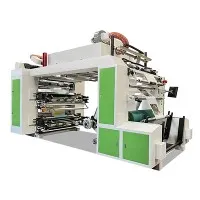
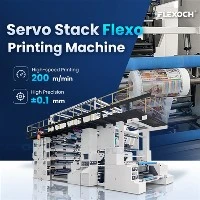
Hey there! As a supplier of stack flexo printing machines, I know firsthand how crucial it is to control the temperature in the printing environment. Temperature can have a significant impact on the quality of your prints, the efficiency of your machines, and even the safety of your workers. In this blog post, I'm going to share some tips on how to keep the temperature in your stack flexo printing environment under control.
Why Temperature Control Matters
Before we dive into the tips, let's talk about why temperature control is so important in stack flexo printing. First and foremost, temperature affects the viscosity of the ink. If the temperature is too high, the ink will become too thin, which can lead to poor print quality, such as smudging and bleeding. On the other hand, if the temperature is too low, the ink will become too thick, which can cause clogging in the printing plates and anilox rollers.
Temperature also affects the drying time of the ink. If the temperature is too high, the ink will dry too quickly, which can cause cracking and peeling. If the temperature is too low, the ink will take longer to dry, which can slow down the printing process and increase the risk of smudging.
In addition to affecting the ink, temperature can also impact the performance of the printing machine itself. High temperatures can cause the machine's components to expand, which can lead to misalignment and other mechanical problems. Low temperatures can cause the machine's components to contract, which can also lead to mechanical problems.
Finally, temperature control is important for the safety of your workers. High temperatures can cause heat stress and other health problems, while low temperatures can cause cold stress and other health problems. By maintaining a comfortable temperature in the printing environment, you can help keep your workers safe and healthy.
Tips for Controlling Temperature in the Stack Flexo Printing Environment
Now that we've talked about why temperature control is important, let's look at some tips for keeping the temperature in your stack flexo printing environment under control.
1. Use a Climate Control System
One of the most effective ways to control the temperature in your stack flexo printing environment is to use a climate control system. A climate control system can help maintain a consistent temperature and humidity level in the printing environment, which can help ensure the quality of your prints and the performance of your machines.
There are several types of climate control systems available, including air conditioning systems, heating systems, and dehumidifiers. When choosing a climate control system, it's important to consider the size of your printing environment, the number of machines you have, and your budget.
2. Monitor the Temperature Regularly
Another important tip for controlling temperature in the stack flexo printing environment is to monitor the temperature regularly. You can use a thermometer or a temperature sensor to measure the temperature in the printing environment. By monitoring the temperature regularly, you can detect any changes in temperature and take action to correct them before they cause problems.
It's also a good idea to keep a record of the temperature readings. This can help you identify any trends or patterns in the temperature and make adjustments to your climate control system as needed.
3. Keep the Printing Environment Well-Ventilated
Proper ventilation is essential for controlling temperature in the stack flexo printing environment. A well-ventilated printing environment can help remove heat and humidity from the air, which can help keep the temperature and humidity levels in check.
There are several ways to improve ventilation in the printing environment. You can install exhaust fans, open windows and doors, or use a ventilation system. When choosing a ventilation system, it's important to consider the size of your printing environment, the number of machines you have, and your budget.
4. Use Insulation
Insulation can help keep the temperature in the stack flexo printing environment more stable. By insulating the walls, ceiling, and floors of the printing environment, you can reduce the amount of heat that enters or leaves the room.
There are several types of insulation available, including fiberglass insulation, foam insulation, and cellulose insulation. When choosing insulation, it's important to consider the R-value, which is a measure of the insulation's ability to resist heat flow. The higher the R-value, the better the insulation.
5. Choose the Right Location for Your Printing Machines
The location of your printing machines can also have an impact on the temperature in the printing environment. It's important to choose a location that is away from sources of heat, such as windows, doors, and heating vents. You should also avoid placing your printing machines in direct sunlight.
In addition to choosing the right location for your printing machines, it's also important to leave enough space between the machines. This can help improve ventilation and reduce the amount of heat generated by the machines.
6. Use Cooling Fans
Cooling fans can help circulate the air in the printing environment and reduce the temperature. You can use ceiling fans, floor fans, or portable fans to improve air circulation.
When using cooling fans, it's important to place them in the right location. You should place the fans near the printing machines to help cool them down. You should also place the fans in areas where there is poor air circulation, such as corners and behind equipment.
7. Maintain Your Printing Machines
Regular maintenance of your printing machines is essential for controlling temperature in the stack flexo printing environment. By keeping your machines clean and well-maintained, you can help ensure that they operate efficiently and generate less heat.
Some of the maintenance tasks you should perform regularly include cleaning the printing plates and anilox rollers, lubricating the machine's components, and checking the machine's alignment. You should also follow the manufacturer's recommended maintenance schedule for your printing machines.
Conclusion
Controlling the temperature in the stack flexo printing environment is essential for ensuring the quality of your prints, the performance of your machines, and the safety of your workers. By using a climate control system, monitoring the temperature regularly, keeping the printing environment well-ventilated, using insulation, choosing the right location for your printing machines, using cooling fans, and maintaining your printing machines, you can help keep the temperature in your printing environment under control.


If you're in the market for a stack flexo printing machine, we offer a wide range of high-quality machines, including the Plastic Film Printing Machine, 4 Colour Flexo Printing Machine, and Pp Woven Bag Printing Machine. If you have any questions or would like to learn more about our products, please don't hesitate to contact us. We'd be happy to help you find the right printing machine for your needs.
References
- "Flexographic Printing: Principles and Practices." Graphic Arts Technical Foundation, 2018.
- "Temperature and Humidity Control in Printing Environments." Printing Industries of America, 2019.
- "The Impact of Temperature on Ink Viscosity and Print Quality." Ink World Magazine, 2020.