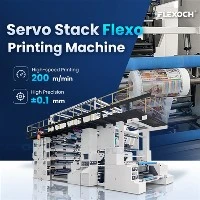
Flexographic printing is a widely used technique in the packaging industry, especially for printing on woven sacks. One of the critical factors that significantly affect the quality of the print on a Woven Sack Flexo Printing Machine is the printing pressure. Proper adjustment of the printing pressure ensures sharp, clear, and consistent prints, which are essential for creating an appealing final product. As a reputable supplier of Woven Sack Flexo Printing Machines, I'm here to share some valuable insights on how to adjust the printing pressure effectively.

Understanding the Importance of Printing Pressure
Before delving into the adjustment process, it's crucial to understand why proper printing pressure is so important. Printing pressure is the force applied between the printing plate and the substrate (the woven sack in this case). This pressure transfers the ink from the plate to the sack. If the pressure is too low, insufficient ink will be transferred, resulting in faint or incomplete prints. On the other hand, if the pressure is too high, it can cause smudging, blurring, or even damage to the printing plate and the substrate. Thus, finding the optimal printing pressure is key to achieving high - quality prints.
Factors Affecting Printing Pressure
Several factors can influence the ideal printing pressure for your Woven Sack Flexo Printing Machine. These include the type of substrate, the viscosity of the ink, the hardness of the printing plate, and the design complexity of the print.
- Substrate Type: Different woven sack materials have different surface characteristics. For example, a coarser - weave sack may require more pressure to ensure proper ink transfer compared to a finer - weave one.
- Ink Viscosity: Thicker ink tends to flow less easily. If the ink is too viscous, more pressure may be needed to transfer it uniformly. Conversely, a very thin ink may require less pressure.
- Printing Plate Hardness: Harder printing plates usually require more pressure to deform slightly and make good contact with the substrate. Softer plates, however, can transfer ink effectively with less pressure.
- Design Complexity: Detailed and intricate designs may need more precise pressure adjustment to ensure that all elements of the design are printed clearly.
-
Detail Image
-


Tools Needed for Pressure Adjustment
To adjust the printing pressure on your Woven Sack Flexo Printing Machine, you'll need a few basic tools:
- Pressure Gauges: These are used to measure the pressure accurately. They can be either mechanical or digital, and they provide a quantitative value of the pressure being applied.
- Shims: Shims are thin pieces of material that can be used to increase or decrease the distance between parts of the printing unit, thereby adjusting the pressure.
- Allen Wrenches and Screwdrivers: These are used to loosen and tighten the various bolts and nuts that hold the printing components in place.
Step - by - Step Guide to Adjusting Printing Pressure
- Initial Setup: Start by ensuring that the printing machine is turned off and all safety measures are in place. Then, check that the printing plate is properly installed on the plate cylinder and that the anilox roller is clean and in good condition.
- Measure the Baseline Pressure: Use the pressure gauge to measure the current pressure between the printing plate and the substrate. This will give you a starting point for the adjustment process.
- Fine - Tuning with Shims: If the pressure is too low, you can insert shims between the plate cylinder and its mounting to increase the pressure. Conversely, if the pressure is too high, you can remove shims. Make small adjustments at a time, typically adding or removing one or two shims at a time, and then re - measure the pressure.
- Use the Machine's Adjustment Mechanisms: Most Woven Sack Flexo Printing Machines come with built - in adjustment mechanisms such as screws or levers. These can be used to fine - tune the pressure between the printing plate and the substrate. Turn the screws or move the levers slowly and carefully, and always re - measure the pressure after each adjustment.
- Test Printing: After each adjustment, perform a test print on a scrap piece of the woven sack material. Examine the print quality closely. Look for signs of proper ink transfer, such as sharp lines and clear colors. If the print is still not satisfactory, continue making small adjustments to the pressure.
- Finalizing the Adjustment: Once the test prints show clear, consistent, and high - quality results, you can consider the pressure adjustment complete. Make sure to record the final pressure settings for future reference.
Troubleshooting Common Pressure - Related Issues
- Faint Prints: If the prints are coming out faint, it's likely that the pressure is too low. Increase the pressure gradually, either by adding shims or using the machine's adjustment mechanism. Also, check the ink viscosity; if it's too thick, thinning it may help.
- Smudged Prints: Smudging can be caused by excessive pressure. Reduce the pressure slowly and test print again. Additionally, make sure that the printing plate is clean and that there is no debris on the substrate.
- Inconsistent Prints: Inconsistent prints may be a result of uneven pressure across the printing width. Check for any misaligned components or uneven shimming. You may need to adjust the pressure at different points along the printing unit to achieve uniformity.
- Video Introduction
Advanced Tips for Optimal Printing Pressure
- Regular Maintenance: Keep your Woven Sack Flexo Printing Machine well - maintained. Regularly clean the anilox roller and printing plate, and check for any signs of wear and tear. A well - maintained machine is more likely to maintain consistent printing pressure.
- Calibration: Periodically calibrate your pressure gauges to ensure accurate readings. This will help you make more precise pressure adjustments.
- Experimentation: Different jobs may require slightly different printing pressures. Don't be afraid to experiment with different pressure settings to find the optimal one for each specific print job.
Related Products
If you're also interested in other types of flexo printing machines, we offer a wide range of options. You can explore our Paper Flexo Printing Machine, which is designed specifically for printing on paper materials. Our Central Impression Flexo Printing Machine provides high - quality and efficient printing solutions, and our High Speed Flexo Printing Machine is perfect for large - scale production with its high - speed capabilities.
Contact Us for Procurement
If you're in the market for a new Woven Sack Flexo Printing Machine or need assistance with maintenance and printing pressure adjustment, we're here to help. Our team of experts has extensive experience in the industry and can provide you with the best solutions for your printing needs. Reach out to us to start a procurement discussion and take your printing operations to the next level.
References
- "Flexographic Printing Technology Handbook", Jennifer A. L. Pieters
- "Printing Machinery: Principles and Applications", John F. Manasso